What's New

Instagram

About Me

Photo Profile
Meetanshi Architecture Designer

Meetanshi is found based on providing the best Magento Extensions and Customized eCommerce Business Solutions perfected to the users’ needs. Our Happy users make us Happy. Complete satisfaction to our clients is what drives and motivates us to work hard. Read More

Tuesday, November 12, 2024

Step-by-Step Guide to Creating a Hyvä Child Theme in Magento 2

 Hyvä Themes is a modern, fast, and performance-oriented theme for Magento 2 that focuses on simplicity and speed. It provides a clean and minimalistic approach, enhancing both the frontend and backend user experience. Creating a child theme based on Hyvä allows you to maintain customizations while ensuring easy updates. This guide will walk you through the process of creating a Hyvä child theme in Magento 2.


Why Create a Hyvä Child Theme?


Creating a child theme in Magento 2 using Hyvä provides key advantages. It allows customization flexibility, enabling you to modify design elements without altering the core theme. The child theme ensures easy updates, as customizations won’t be overwritten when the parent theme is updated. Additionally, it promotes maintainable code, keeping customizations separate from the core theme, making your store easier to manage and update without conflicts.


Conclusion

Creating a Hyvä child theme in Magento 2 is a straightforward process that allows you to customize your store without modifying the core theme. By following these steps, you can easily maintain a secure and optimized store while implementing your unique design and functionality. With the right structure in place, you’ll be able to manage customizations efficiently, ensuring that your Magento store remains flexible and up-to-date.


For a detailed blog :https://meetanshi.com/blog/how-to-create-a-hyva-child-theme-in-magento-2/





Understanding and Applying the APSB24-61 Security Patch in Magento 2

 Magento 2 store owners must prioritize security to protect their customers' data and maintain trust. Adobe’s APSB24-61 security patch addresses vulnerabilities that could potentially be exploited. Applying this patch ensures your store remains secure and compliant with the latest security standards. Here's a step-by-step guide to help you apply the patch effectively.


What is APSB24-61?


APSB24-61 is a security bulletin released by Adobe to fix known vulnerabilities in Magento 2. This patch focuses on enhancing the platform’s security by addressing issues that could lead to data breaches or unauthorized access. Adobe highly recommends all Magento 2 store owners apply the patch to safeguard their stores against potential threats.


Conclusion:


Applying the APSB24-61 security patch is a vital step in protecting your Magento 2 store from vulnerabilities and potential threats. By following the steps above and adhering to best practices, you can ensure your store remains secure, trustworthy, and compliant with Adobe’s latest security standards. Stay proactive with regular updates to safeguard your business and customers.


For a detailed Blog:https://meetanshi.com/blog/apsb24-61-security-patch/

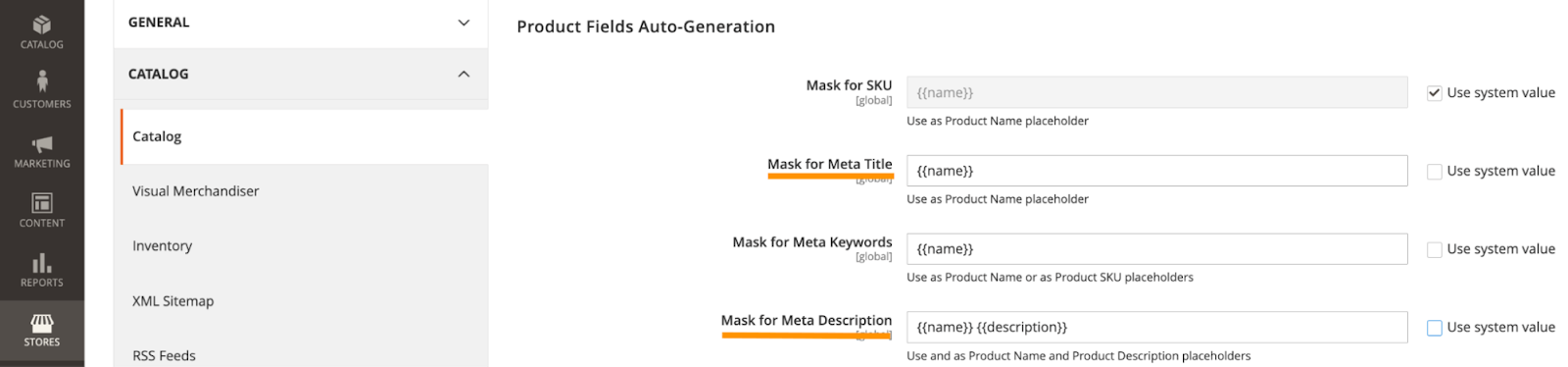
Update Titles & Meta Descriptions in Magento 2

 Optimizing your Magento 2 store’s titles and meta descriptions is crucial for improving search engine visibility and driving organic traffic. This guide will walk you through the steps to update titles and meta descriptions for your Magento 2 store, helping you boost your SEO performance.


Why Titles and Meta Descriptions Matter in SEO


Titles and meta descriptions are crucial for SEO, influencing search engine rankings and user engagement. Optimized titles with relevant keywords help search engines understand your content, improving visibility in search results. They also act as a preview for users, encouraging clicks and boosting click-through rates (CTR). Well-crafted descriptions enhance user experience by ensuring visitors find relevant content while supporting keyword targeting and brand consistency. Regular updates to these elements align them with search trends and user needs, driving better traffic and engagement.


Conclusion

Updating titles and meta descriptions in Magento 2 is essential to SEO optimization. Following the steps outlined above and adhering to best practices can enhance your store's visibility, drive more traffic, and improve user engagement. Regularly review and update these fields to stay ahead in search engine rankings.


For a detailed blog: https://meetanshi.com/blog/how-to-change-title-and-meta-description-in-magento-2/


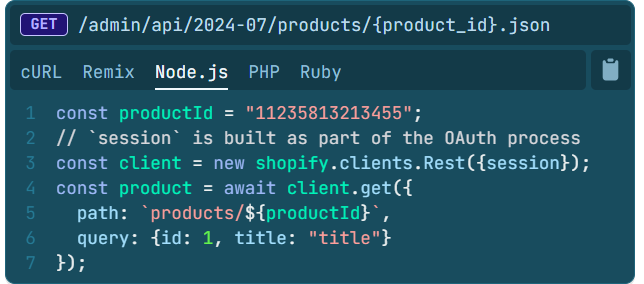
Mastering Shopify API Integration: Best Practices & Real-World Examples

 Shopify APIs are powerful tools that enable businesses to extend their Shopify stores with custom features, integrate third-party systems, and automate key workflows. Whether you are a developer looking to integrate Shopify with other platforms or a merchant seeking to enhance your store’s functionality, understanding how to effectively use Shopify APIs is essential. This blog explores the best practices for Shopify API integration and shares real-world examples to help you get the most out of Shopify’s API ecosystem.


What is Shopify API Integration?


Shopify API integration allows you to connect your Shopify store with external services and applications. With access to Shopify's backend, you can automate workflows, customize product pages, manage orders, and extend the functionality of your store. Shopify offers a variety of APIs, including REST and GraphQL APIs, to enable seamless interactions between Shopify and external tools or services.


Tips for Successful Shopify API Integration

For successful Shopify API integration, utilize Shopify's detailed documentation to understand guidelines and best practices. Regularly check for API updates to ensure compatibility with new features. If you're on Shopify Plus, leverage advanced features like higher rate limits and enhanced customization through the Storefront API. Collaborating with a Shopify expert can also simplify the process, ensuring efficient and seamless integrations for your store.


Conclusion

Mastering Shopify API integration allows you to fully unlock the potential of your Shopify store. By following best practices and using real-world examples as inspiration, you can create robust, efficient, and scalable integrations that streamline operations, improve customer experiences, and drive business growth. Whether you’re automating workflows or building custom solutions, Shopify’s APIs provide endless opportunities to enhance your store’s functionality.

For a detailed blog:https://meetanshi.com/blog/shopify-api/

Monday, November 11, 2024

Hyvä Theme License Explained: Cost, Benefits, and How It Works

 The Hyvä Theme has gained immense popularity for its performance-oriented approach to Magento frontend development. A crucial aspect of adopting Hyvä is understanding its licensing model, which ensures developers and merchants can access and utilize its powerful features. This blog explores what the Hyvä theme license entails, its costs, and the benefits it offers to Magento store owners and developers.


What Is the Hyvä Theme License?


The Hyvä theme license is a subscription-based model that grants merchants and developers access to the Hyvä theme’s core files, updates, and support. Unlike free open-source themes, the Hyvä license ensures exclusivity and high-quality development standards while funding continuous improvements and community support.


The license is tied to a specific domain, meaning each store requires its own license. This approach ensures that only authorized users benefit from Hyvä’s features, making it a fair and sustainable model.


How Much Does the Hyvä Theme License Cost?


As of 2024, the Hyvä theme license costs €1,000 (approximately USD 1,100) per domain. This fee includes one year of updates and support.


After the first year, users can renew the license annually at a discounted rate of €500 (around $550 USD) to continue receiving updates and support. Renewal is optional, and the theme remains functional even without it, though access to updates and support will cease.


Conclusion

The Hyvä theme license is more than just a subscription—it’s a gateway to transforming your Magento store’s front end. With its focus on speed, flexibility, and community-driven development, Hyvä empowers merchants to create high-performing, user-friendly storefronts. Investing in a Hyvä theme license ensures you stay ahead in the competitive e-commerce landscape of 2024.


For a detailed blog:https://meetanshi.com/blog/hyva-theme-license/

Mastering Robots.txt in Shopify: Best Practices and Tips for 2024

 Robots.txt plays a crucial role in controlling how search engine bots interact with your Shopify store. With the introduction of customizable robots.txt files in Shopify, merchants now have more control over their site’s SEO strategy. This blog provides a comprehensive guide to understanding, configuring, and optimizing the robots.txt file for your Shopify store.


What is Robots.txt in Shopify?

Robots.txt is a plain text file stored on your website’s server that instructs search engine bots on which pages or sections of your website to crawl or ignore. By controlling bot access, you can optimize crawl efficiency, improve SEO, and protect sensitive content from being indexed.

In Shopify, the robots.txt file is automatically generated and comes with default rules. However, merchants can now customize it to better suit their needs.


Why is Robots.txt Important for Shopify?

Robots.txt is essential for Shopify as it controls how search engine bots interact with your store, ensuring they focus on critical pages like products and blogs while avoiding irrelevant ones like cart or checkout. This optimizes your crawl budget, reduces duplicate content, and enhances SEO performance. With Shopify’s customizable robots.txt, merchants can tailor the file to protect sensitive data and improve search engine visibility effectively.

Conclusion

A well-configured robots.txt file can significantly enhance your Shopify store’s SEO and overall search visibility. By understanding its functionality and following best practices, you can optimize bot behavior, protect sensitive content, and ensure your critical pages get the attention they deserve.

For a detailed blog

:https://meetanshi.com/blog/shopify-robots-txt/


Understanding Luma Theme Fallback in Hyvä: Benefits and Use Cases

 Hyvä themes have revolutionized the Magento frontend development space with their simplicity, improved performance, and modern tech stack. Luma Theme Fallback ensures seamless compatibility for customizations and third-party extensions among its many features. This blog delves into the concept of Luma Theme Fallback in Hyvä, its benefits, and practical use cases.


What Is Luma Theme Fallback in Hyvä?


Luma Theme Fallback refers to the mechanism in Hyvä that allows the theme to utilize Magento’s default Luma theme templates and files when certain components or functionalities are not explicitly available in Hyvä.


How Does Luma Theme Fallback Work?


Hyvä themes utilize a custom setup that determines whether a feature or component is available in Hyvä. If it is not, the fallback mechanism retrieves the necessary layout XML, templates, and static assets from the Luma theme.


This fallback is configured during the theme setup phase, ensuring that developers can leverage Luma components without manually porting them into the Hyvä environment.


Conclusion

Luma Theme Fallback in Hyvä is a valuable feature that simplifies the transition to a modern Magento frontend. By ensuring compatibility with legacy components and third-party extensions, it provides businesses with the flexibility to adopt Hyvä at their own pace.


For long-term success, however, businesses should prioritize replacing Luma components with native Hyvä solutions to fully realize the benefits of this innovative frontend framework.


For a detailed blog: https://meetanshi.com/blog/what-is-luma-theme-fallback-in-hyva/

Thursday, October 24, 2024

Step-by-Step Guide to Setting Up Google Shopping Ads in Magento 2

 Google Shopping Ads are a powerful way to promote your Magento 2 store products, providing visually engaging ads that appear on Google search results and other relevant platforms. Setting up Google Shopping Ads for Magento 2 can drive more traffic and increase conversions by showcasing your products directly to potential customers. Here’s a step-by-step guide to help you set up and optimize Google Shopping Ads in Magento 2. 


Create a Google Merchant Center Account:

Sign up on Google Merchant Center with your Google account. Complete business details and verify your domain for account approval.


Set Up Magento 2 Google Shopping Feed:

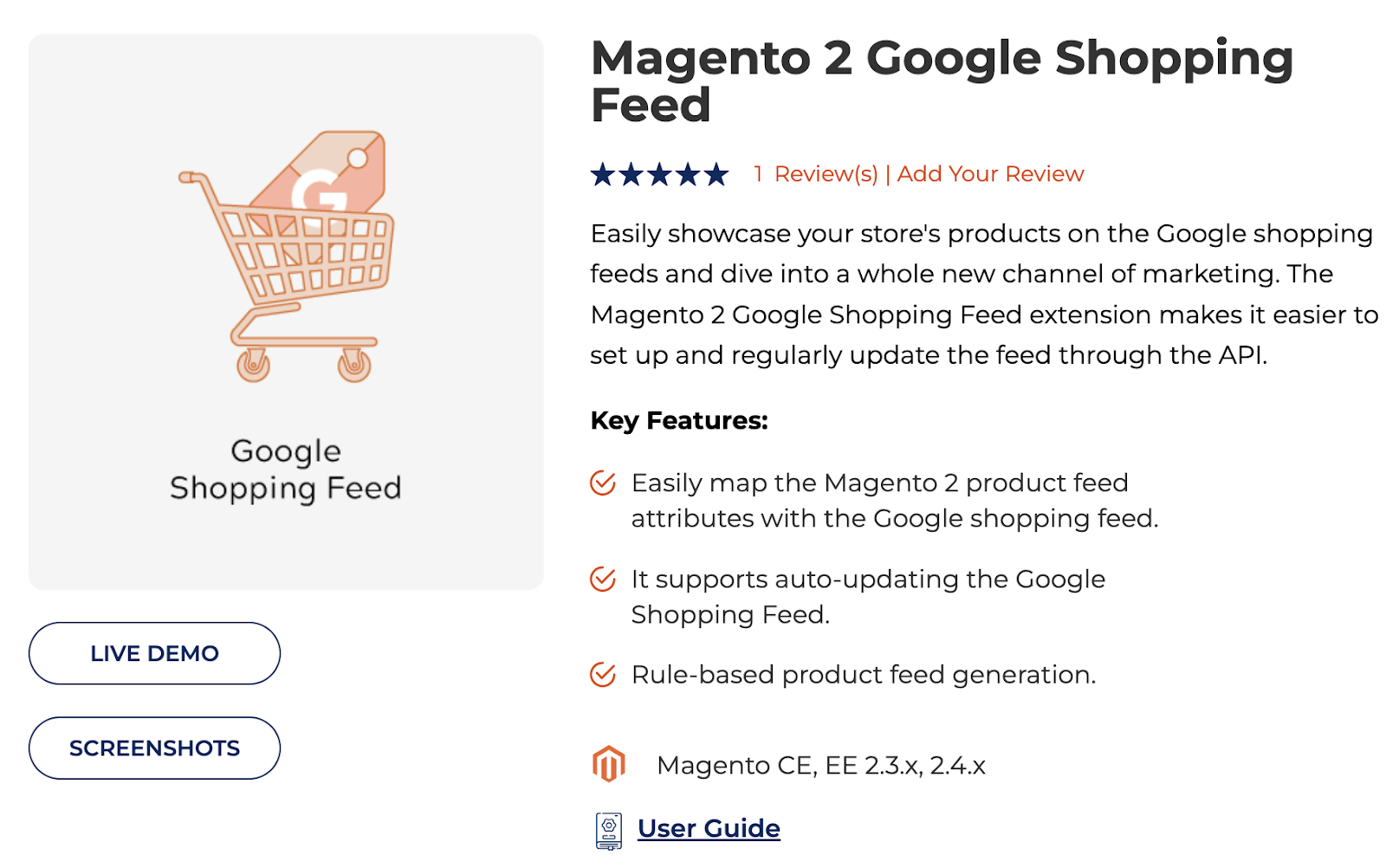
Generate a product feed using a CSV export or an extension like Meetanshi's Google Shopping Feed. Format and upload the feed in Merchant Center under Products > Feeds.


Link Google Merchant Center to Google Ads:

Go to Settings > Linked Accounts in Merchant Center and select Google Ads. Then, under Tools & Settings > Linked Accounts, approve the link in Google Ads.


Create a Google Shopping Campaign in Google Ads:

Create a new Shopping campaign under Sales or Website Traffic in Google Ads. Link your Merchant Center, set a bidding strategy, and choose your budget.


Configure Ad Groups and Targeting:

Create ad groups based on categories or individual products in your campaign. Select Product Shopping Ad for single items or Showcase Shopping Ad for collections.


 Optimize Your Product Feed for Better Performance:

Use relevant keywords in titles and descriptions and ensure high-quality images. Keep prices and availability updated to avoid disapprovals.


Track Performance and Make Adjustments:

Monitor campaign metrics like clicks and conversions in Google Ads and Google Analytics. Based on performance insights, adjust bids and targeting.


Use Magento 2 Extensions for Enhanced Features:

Automate and optimize with extensions like Meetanshi’s Google Shopping Feed or Wyomind’s Advanced Google Shopping for seamless feed management.


Setting up Google Shopping Ads in Magento 2 is a highly effective way to promote your products and boost sales. With proper setup and optimization, you can reach more potential customers and increase your conversion rates. Use the steps outlined above to ensure a successful Google Shopping campaign for your Magento 2 store.

\https://meetanshiblog.quora.com/Step-by-Step-Guide-to-Setting-Up-Google-Shopping-Ads-in-Magento-2                                                                                                                                                                                                             

https://in.pinterest.com/pin/833377106079894980                                                                                                                                                                                                       

https://www.patreon.com/posts/step-by-step-to-114670725

https://ko-fi.com/meetanshi/gallery#galleryItemView                                                                                                                                                                                                    

https://flipboard.com/@Meetanshi2019/-how-to-set-up-magento-2-google-shopping/a-bijAKB6kTNyPovOtr87JZQ%3Aa%3A3219892375-7ceed06099%2Fmeetanshi.com                                                                                                                                                                                                    

https://www.scoop.it/topic/magento-2-extensions-by-meetanshi-4/p/4161959668/2024/10/25/how-to-set-up-magento-2-google-shopping-ads                                                                                                                                                                                                              

https://meetanshi.wordpress.com/2024/10/25/step-by-step-guide-to-setting-up-google-shopping-ads-in-magento-2/                                                                                                                                                                                                               

https://meetanshi.wordpress.com/2024/10/25/step-by-step-guide-to-setting-up-google-shopping-ads-in-magento-2-2/                                                                                                                                                                                                          

http://637c59844644b.site123.me/                                                                                                                                                                                                       

https://www.anibookmark.com/site/stepbystep-guide-to-setting-up-google-shopping-ads-in-magento-2-ab1813171.html                                                                                                                                                                                                             

https://magentoexpertforum.com/showthread.php/36838-Step-by-Step-Guide-to-Setting-Up-Google-Shopping-Ads-in-Magento-2


Get more of our update !