What's New

Instagram

About Me

Photo Profile
Meetanshi Architecture Designer

Meetanshi is found based on providing the best Magento Extensions and Customized eCommerce Business Solutions perfected to the users’ needs. Our Happy users make us Happy. Complete satisfaction to our clients is what drives and motivates us to work hard. Read More

Friday, January 24, 2025

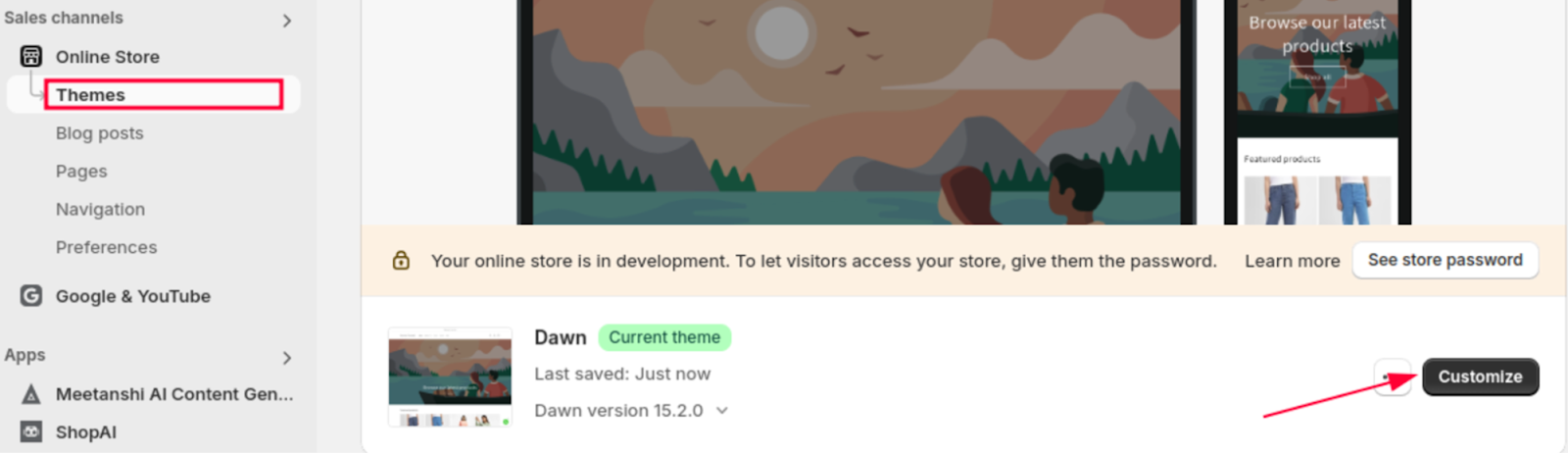
Step-by-Step Guide to Adding a Mega Menu to Shopify Without Using an App

 Step-by-Step Guide to Adding a Mega Menu to Shopify Without Using an App

Mega menus are an excellent way to enhance navigation on your Shopify store, particularly if you have multiple product categories or a large inventory. While many apps can create mega menus, you can also achieve this natively in Shopify by customizing your theme’s code. Here’s a step-by-step guide to adding a mega menu to your Shopify store without using an app.


Back-Up Your Theme

Before making any changes, duplicate your current theme to ensure you can revert back if needed.

Set Up Navigation Links

Create and organize your menu items, including categories and subcategories, through the Shopify admin.

 Edit Theme Code

Access your theme’s code in the "header.liquid" file and locate the section that renders the navigation menu.

 Add HTML Structure for Mega Menu

Insert the necessary HTML structure to display the mega menu for subcategories under main menu items.

Style the Mega Menu with CSS

Use custom CSS to style the mega menu, making it visually appealing and responsive to different screen sizes.

 Add JavaScript for Hover Effect (Optional)

Implement JavaScript for hover functionality so the mega menu appears when the user hovers over a parent item.

Preview and Test

Save your changes and preview the mega menu on your storefront to ensure it functions correctly.

Conclusion

Adding a mega menu to Shopify without using an app allows you to maintain control over your design while saving on costs. By planning your structure, customizing your theme’s code, and styling with CSS, you can create a professional, user-friendly navigation experience for your customers. With some creativity and attention to detail, your mega menu can improve site usability and boost sales. If you're not comfortable editing code, consider consulting a Shopify expert to ensure a smooth implementation

For a detailed blog :https://meetanshi.com/blog/add-a-mega-menu-to-shopify/


Thursday, January 23, 2025

7+ Eye-Opening Buy Now Pay Later Trends for 2025

 Buy Now Pay Later (BNPL) services have revolutionized how consumers shop, offering flexibility and convenience that traditional payment methods often lack. As we move into 2025, the BNPL sector continues to grow, fueled by new technologies, consumer demands, and evolving market dynamics. This blog dives into some of the most impactful statistics and trends shaping the BNPL landscape in 2025.

Global BNPL Market Growth


The BNPL market is projected to reach a staggering $500 billion by the end of 2025, with an annual growth rate of over 20%. This growth is driven by increasing adoption across e-commerce platforms, particularly in regions like Asia-Pacific and Europe, where BNPL has seen rapid acceptance.


Rising Consumer Adoption


A recent survey shows that 45% of consumers globally have used a BNPL service at least once, and this number is expected to rise to 60% by the end of 2025. Millennials and Gen Z are the key demographics driving this adoption, with their preference for flexible payment options and tech-savvy shopping behaviors.


Shift to In-Store BNPL


While BNPL started as an e-commerce phenomenon, 30% of BNPL transactions are now happening in physical stores. Retailers are integrating BNPL solutions at checkout points to cater to customers who want flexibility without upfront payment.


Emergence of BNPL for High-Value Purchases


Traditionally associated with small-ticket items, BNPL is now being adopted for high-value purchases such as electronics, travel, and even healthcare. In fact, 20% of BNPL users in 2025 are expected to use it for purchases exceeding $1,000.


Increased Regulation and Consumer Protection


Governments and financial institutions are paying closer attention to the BNPL industry. By 2025, 40% of countries offering BNPL services will have introduced regulations to ensure transparency, prevent consumer debt traps, and establish fair practices among providers.


Conclusion


The Buy Now Pay Later industry is evolving rapidly, reshaping the way consumers approach spending and payments. With global expansion, technological advancements, and a focus on regulation and sustainability, 2025 promises to be a transformative year for BNPL. Merchants who embrace these 


For a detailed blog:https://meetanshi.com/blog/buy-now-pay-later-statistics/

Simplified Guide: Hiding Prices for Specific Products in Shopify

 If you're a Shopify merchant looking to hide prices for specific products on your store, you’ve come to the right place. There are various scenarios where hiding prices can be beneficial—such as when you want to encourage customers to contact you for a quote, highlight exclusive items, or manage pricing for wholesale customers. This guide will walk you through the easy steps to achieve this.


Why Hide Prices on Shopify?

Hiding prices can serve multiple business goals, encouraging customer interaction by prompting customers to reach out for custom pricing or quotes. It can also be used to highlight exclusivity by keeping the pricing hidden for high-end or exclusive items to enhance their perceived value. Additionally, managing wholesale pricing becomes easier by displaying pricing only to registered wholesale buyers. Finally, it is useful for special offers where prices for upcoming promotions or limited-time deals need to be hidden.


Conclusion

Hiding prices for specific products on Shopify is a straightforward process that can significantly benefit your business strategy. Whether you use apps, manual adjustments, or custom code, the key is to ensure a smooth experience for your customers. Choose the method that best fits your needs and start implementing hidden prices on your Shopify store today!


For a detailed blog :https://blog.meetanshi.com/how-to-hide-prices-on-shopify/

40+ Referral Marketing Statistics: Unveiling the Power and Impact on Your Business

 Referral marketing has evolved into one of the most powerful tools for businesses aiming to drive growth, increase brand awareness, and enhance customer loyalty. According to studies, word-of-mouth marketing is not only effective but also cost-efficient. But what do the numbers say? In this blog, we’ll dive into over 40 key referral marketing statistics to help you understand its impact on businesses today.


The Magento 2 Extra Fee Extension offers several key features that enhance fee management in your store. It allows store owners to apply custom fees, such as fixed, percentage-based, or per-product fees, with flexible conditions like cart totals, customer groups, shipping methods, and payment options. Fees can be easily managed from the Magento admin panel and displayed on the checkout or cart pages with customizable messages. Additionally, the extension supports refundable fees, condition-based fee rules, and customer group-specific charges, making it highly adaptable for various business needs. Overall, it provides a powerful, customizable solution for adding extra charges and improving revenue generation.


The statistics clearly demonstrate the immense impact of referral marketing on business growth, customer retention, and overall success. By leveraging the power of word-of-mouth and creating incentive-based referral programs, businesses can tap into a powerful channel for increasing revenue while building lasting customer relationships. If you’re not already utilizing referral marketing, now is the time to start seeing the results firsthand.

Conclusion: 

The statistics clearly demonstrate the immense impact of referral marketing on business growth, customer retention, and overall success. By leveraging the power of word-of-mouth and creating incentive-based referral programs, businesses can tap into a powerful channel for increasing revenue while building lasting customer relationships. If you’re not already utilizing referral marketing, now is the time to start seeing the results firsthand.


For a detailed blog:https://meetanshi.com/blog/referral-marketing-statistics/

Wednesday, January 22, 2025

How to Identify the Shopify Theme a Website Is Using: A Quick Guide

Have you ever come across a stunning Shopify store and wondered what theme it’s using? Identifying a website's theme can inspire your store’s design or provide insights into popular features used by successful merchants. In this guide, we’ll show you simple methods to detect the Shopify theme a website is using.


Step 1: Check the Website Footer

Scroll to the bottom of the website and look for "Powered by Shopify" or a theme name like "Debut" or "Dawn." Note that some stores may remove or customize this footer message.


Step 2: View the Page Source Code

Right-click the website and select "View Page Source." Search for /themes/ or theme_name= in the code, which often reveals the theme’s name.


Step 3: Use Browser Developer Tools

Open the website, right-click, and select "Inspect." Under the "Sources" tab, search for /themes/ in file paths to find theme details.


Step 4: Use Online Tools

Enter the website URL into tools like "Shopify Theme Detector" or "What Theme Is That" to automatically identify the theme.


Step 5: Contact the Store Owner

If other methods don’t work, reach out to the store owner through their contact form and politely ask about their theme.


Why Knowing the Theme Matters

Identify Shopify themes to gain design inspiration, discover useful features, or purchase a premium theme for your store.


Conclusion

Detecting the Shopify theme a website is using is easy with the right approach. Follow these steps to uncover design ideas and elevate your own Shopify store. Try it today and start exploring!


For a detailed blog:https://meetanshi.com/blog/how-to-find-shopify-theme-a-store-is-using/


Step-by-Step Guide: Adding a 'Request a Quote' Button to Your Shopify Store


As a Shopify merchant, you might encounter customers who prefer to request custom pricing or negotiate terms for certain products. Adding a "Request a Quote" button to your Shopify store can provide a seamless way to cater to these customers, enhance user experience, and potentially increase sales.

In this guide, we’ll walk you through the steps to implement a "Request a Quote" feature in your Shopify store.


Step 1: Determine the Need for a 'Request a Quote' Button

Evaluate if your business model benefits from a "Request a Quote" feature, especially for custom or bulk products, variable pricing, or B2B clients.

Step 2: Choose a Method to Add the Feature

Decide between using a Shopify app like "Request a Quote & Hide Prices" or implementing custom code for a tailored solution.

Step 3: Implement the 'Request a Quote' Button via an App

Install a "Request a Quote" app from the Shopify App Store.

Configure settings like button design, placement, and email notifications.

Test the feature to ensure it’s functioning correctly.


Step 4: Add the Button via Custom Code (Optional)

Go to Online Store > Themes > Actions > Edit Code.

Edit the product template file and insert the button code.

Add functionality with JavaScript or Shopify Scripts and style the button using CSS.

Test to confirm the button works as intended.


Step 5: Promote the 'Request a Quote' Feature

Use homepage banners, email campaigns, and product page descriptions to inform customers about the new feature.

Step 6: Monitor and Optimize

Track quote requests using Shopify analytics or app reports, gather feedback, and continuously refine the feature.

Conclusion

Adding a "Request a Quote" button to your Shopify store can help you better serve your customers and capture leads for high-value sales. Whether you use an app or custom code, implementing this feature is a worthwhile investment for businesses offering custom or bulk products.

For a detailed blog :https://meetanshi.com/blog/how-to-add-a-request-a-quote-button-in-shopify/


Tuesday, January 21, 2025

Step-by-Step Guide to a Seamless PrestaShop to Shopify Migration in 2025

 Migrating your online store from PrestaShop to Shopify is a big decision, but it can offer significant advantages for your business. Shopify’s intuitive interface, powerful tools, and scalability make it an attractive choice for e-commerce businesses looking to streamline operations and enhance user experiences. In this guide, we’ll walk you through the steps to ensure a smooth and successful migration in 2025.


Why Migrate from PrestaShop to Shopify?

Before diving into the steps, it’s essential to understand why many businesses choose to migrate to Shopify. Shopify’s dashboard is user-friendly and simple to navigate, making it ideal even for beginners. It provides reliable hosting with minimal downtime, ensuring uninterrupted service. With access to a wide range of customizable themes, businesses can create a store design that aligns with their brand identity. Shopify also supports numerous powerful integrations, offering tools to enhance store functionality and streamline operations. Furthermore, its scalability makes it a suitable platform for businesses of all sizes, from startups to enterprises.


Conclusion

Migrating from PrestaShop to Shopify in 2025 can be a game-changer for your business. By following this step-by-step guide, you can ensure a seamless transition while minimizing disruptions. Remember to plan ahead, choose the right migration method, and thoroughly test your new store before launching. With Shopify’s powerful platform, you’ll be well-equipped to scale your e-commerce business and provide an exceptional shopping experience for your customers.


For a detailed blog :https://meetanshi.com/blog/how-to-migrate-prestashop-to-shopify/

The Role of Trust Signals in Reducing Cart Abandonment

 Cart abandonment is a significant challenge for online retailers, with an average abandonment rate of nearly 70%. While many factors contribute to cart abandonment, one of the most critical yet often overlooked reasons is a lack of trust. Trust signals play a crucial role in reassuring potential customers and reducing their hesitation during the checkout process. In this blog, we’ll explore what trust signals are, why they matter, and how to implement them effectively to reduce cart abandonment in your online store.


What Are Trust Signals?

Trust signals on your website convey credibility, reliability, and security to potential customers. These signals help build confidence in your brand, products, and checkout process. Trust signals can take many forms, ranging from design elements and third-party certifications to customer reviews and transparent policies.

Why Trust Signals Matter

When customers shop online, they can’t physically interact with products or meet the seller. This lack of personal connection can lead to skepticism, especially for first-time visitors. Trust signals help bridge this gap by addressing common concerns such as payment security, product quality, and customer service reliability. By alleviating these doubts, trust signals encourage customers to complete their purchases.

Conclusion

Trust signals are essential for building confidence and encouraging customers to complete their purchases. By addressing common concerns and demonstrating your commitment to quality and security, you can significantly reduce cart abandonment and boost conversions. Start by assessing your current website for trust signals and gradually implement the strategies outlined above. Over time, you’ll see the impact of trust on your bottom line—and on your customers’ shopping experience.


For a detailed blog:https://meetanshi.com/blog/abandonment-statistics/


Get more of our update !