What's New

Instagram

About Me

Photo Profile
Meetanshi Architecture Designer

Meetanshi is found based on providing the best Magento Extensions and Customized eCommerce Business Solutions perfected to the users’ needs. Our Happy users make us Happy. Complete satisfaction to our clients is what drives and motivates us to work hard. Read More

Thursday, February 6, 2025

How to Easily Cancel or Delete Orders in Shopify

 Managing orders efficiently is crucial for any Shopify store owner. Whether due to customer requests, errors, or inventory issues, knowing how to cancel or delete orders can save time and prevent confusion. This tutorial provides a step-by-step guide to help you easily cancel or delete orders in Shopify.


How to Cancel Orders in Shopify:


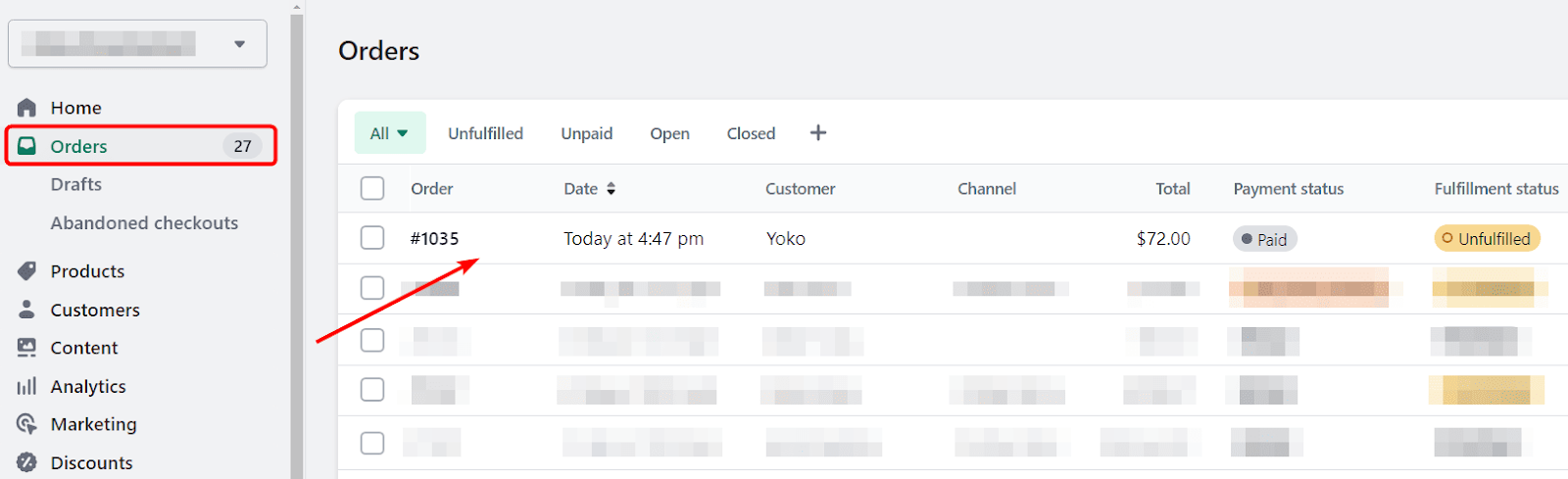
Shopify doesn’t allow permanent deletion of real orders for security and auditing reasons. However, you can manage unwanted orders by archiving them. To do this, go to the "Orders" section in your Shopify Admin, select the order you want to archive, click on "More actions," and choose "Archive order." For test orders, enable test mode in payment settings, then select and delete the test orders as needed. Keep in mind that deletion is only possible for test orders, not actual transactions.


How to Delete Orders in Shopify:

Shopify doesn’t allow permanent deletion of real orders for security and auditing reasons. However, you can manage unwanted orders by archiving them. To do this, go to the "Orders" section in your Shopify Admin, select the order you want to archive, click on "More actions," and choose "Archive order." For test orders, enable test mode in payment settings, then select and delete the test orders as needed. Keep in mind that deletion is only possible for test orders, not actual transactions.


While Shopify doesn’t allow permanent deletion of real orders, canceling and archiving are effective ways to manage your store’s order flow. Following this step-by-step guide will help you maintain an organized and efficient Shopify dashboard.


For Detailed blog:https://meetanshi.com/blog/cancel-delete-orders-in-shopify/

Wednesday, February 5, 2025

Magento 2 Development Fix: Solving the bccomp() Undefined Function Error

 When working with Magento 2, developers often encounter errors that can disrupt the smooth functioning of their online stores. One such error is the "Call to undefined function bccomp()". This guide will walk you through the causes of this error and provide a step-by-step solution to fix it.


What is the bccomp() Function?


The bccomp() function is part of the BCMath (Binary Calculator) extension in PHP. It is used to compare two arbitrary precision numbers. Magento 2 relies on this function for operations involving precise mathematical calculations, especially when handling large numbers or currency calculations.


Why Does This Error Occur?


The "Call to undefined function bccomp()" error typically occurs because the BCMath extension is not enabled in your PHP configuration. Without this extension, PHP cannot recognize the bccomp() function, resulting in this error.


After making the changes, verify that BCMath is active. Clear Magento cache and recompile to ensure the changes take effect.


Reload your Magento 2 store. The error should now be resolved.

The "Call to undefined function bccomp()" error is a common issue caused by a missing PHP extension. By following the steps above, you can quickly diagnose and fix the problem, ensuring your Magento 2 store operates smoothly.


If you continue to experience issues, double-check your PHP version and configuration, as compatibility issues may sometimes cause similar errors.


For a detailed blog:https://meetanshi.com/blog/call-to-undefined-function-bccomp-in-magento-2/

How to Pause Your Shopify Store: A Complete Step-by-Step Guide


Running a Shopify store can be a rewarding yet demanding endeavor. Sometimes, life or business circumstances might require you to pause your store while you focus on other priorities temporarily. Whether you're taking a break for personal reasons, seasonal adjustments, or need time to make major updates, pausing your Shopify store can help.


Why You Might Want to Pause Your Shopify Store


There are several reasons why you might want to pause your Shopify store temporarily. If you run a seasonal business, pausing your store during the off-season can help you cut costs while keeping your store ready for when demand returns. Storeowners undergoing a major rebranding or redesign may also choose to pause their store to work on updates without disrupting the customer experience. Personal circumstances, such as travel, health, or other commitments, might also require a break from daily store management. Additionally, if you're facing financial constraints, pausing your store can reduce expenses while still maintaining your Shopify account and data. Whatever the reason, pausing your Shopify store allows you to step away while preserving your business for a future relaunch.


Conclusion


By following the steps outlined in this guide, you can easily pause and later unpause your Shopify store whenever needed. Make sure to review the settings and customize the customer-facing message, so they know exactly when to expect your return!


For a detailed blog:https://meetanshi.com/blog/how-to-pause-shopify-store/

Tuesday, February 4, 2025

How to Update Checkout Summary When Changing Shipping Method in Magento 2


In Magento 2, the checkout summary plays a crucial role in providing customers with real-time updates on their order totals, including shipping costs, discounts, and taxes. However, by default, Magento 2 does not always refresh the checkout summary dynamically when a customer selects a different shipping method. This can lead to confusion and abandoned carts.


In this guide, we’ll show you how to automatically update the checkout summary when a customer changes the shipping method in Magento 2.


Why Update the Checkout Summary on Shipping Method Selection?


Keeping the checkout summary dynamic ensures:

Customers see accurate shipping costs instantly.

Fewer abandoned carts due to unexpected charges at the final step.

A smoother and more user-friendly checkout experience.


Updating the checkout summary when changing the shipping method in Magento 2 enhances user experience and prevents checkout confusion. By implementing the Knockout.js approach, you ensure a seamless shopping journey without requiring a page reload.


If you have any questions or need assistance, drop them in the comments below


For a detailed blog:https://meetanshi.com/blog/sell-amazon-products-on-shopify/ 

The Ultimate Guide to Selling Amazon Products on Shopify

 Selling Amazon products on Shopify is an excellent way for merchants to expand their reach and maximize revenue. By integrating the two platforms, sellers can manage inventory, streamline fulfillment, and provide customers with a seamless shopping experience. In this guide, we'll walk you through the process of selling Amazon products on Shopify, including integration methods, best practices, and key strategies for success.


Why Sell Amazon Products on Shopify?


Selling Amazon products on Shopify allows merchants to leverage the massive audience of Amazon while maintaining control over branding and customer experience. Shopify provides a customizable storefront where sellers can highlight their products, build brand loyalty, and drive sales through independent marketing efforts. Additionally, Shopify’s flexibility enables different selling models, including dropshipping, fulfillment by Amazon (FBA), and affiliate marketing.


Selling Amazon products on Shopify is a powerful strategy for entrepreneurs looking to expand their e-commerce business. By integrating the two platforms, optimizing product listings, and implementing strong marketing tactics, you can create a profitable online store. Whether you're leveraging Amazon's fulfillment network or running an independent Shopify brand, this guide provides the foundation for success. Ready to start selling? Take the first step today and turn your Shopify store into a thriving Amazon-powered business!


For a detailed blog : https://meetanshi.com/blog/sell-amazon-products-on-shopify/

Why Magento 2 Patch APSB23-35 is Crucial for Your Store’s Security

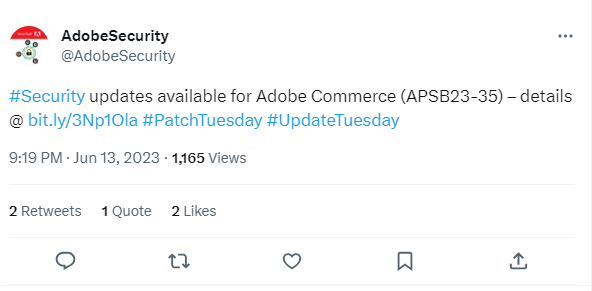
 Security is a top priority for any eCommerce business, and Magento store owners must stay vigilant against emerging threats. Adobe has released Magento 2 Patch APSB23-35, addressing critical vulnerabilities that could compromise store security. If you haven’t applied this patch yet, your store could be at risk of data breaches, malware attacks, and other cyber threats.


In this blog, we will explore why Magento 2 Patch APSB23-35 is crucial for your store’s security, what vulnerabilities it fixes, and how you can apply it to safeguard your business.

Understanding Magento 2 Patch APSB23-35


Patch APSB23-35 is a security update released by Adobe for Magento 2 stores, aiming to address newly discovered vulnerabilities. Cyber attackers are always looking for loopholes in eCommerce platforms, and outdated Magento versions are prime targets. Adobe regularly releases patches to close these security gaps and enhance platform stability.


How to Install Magento 2 Patch APSB23-35


To install Magento 2 Patch APSB23-35, start by backing up your store files and database to prevent data loss. Next, ensure that your Magento 2 version is compatible with the patch. Download the APSB23-35 patch from Adobe’s official website and use SSH commands to apply it to your Magento installation.


Magento 2 Patch APSB23-35 is a critical security update that every store owner should apply immediately. Ignoring security patches can leave your store vulnerable to cyberattacks, leading to data breaches, financial losses, and reputational damage. By staying proactive with security updates, you can protect your business, maintain customer trust, and ensure seamless eCommerce operations.

For a detailed blog:https://meetanshi.com/blog/install-magento-2-patch-apsb23-35/

Sunday, January 26, 2025

The Most Downloaded Mobile Apps of 2025: Trends and Insights

 The mobile app industry continues to evolve rapidly, shaping how we communicate, shop, and entertain ourselves. As we move through 2025, a few trends and key insights stand out from the latest download statistics. This blog explores the most downloaded mobile apps of the year, what’s driving their popularity, and the lessons businesses can learn.


Shopify Add to Cart Liquid Code: Manual Method Explained


The Most Downloaded Apps of 2025


Here’s a look at some of the top mobile apps that dominated download statistics in 2025:


TikTok: The reigning champion of short videos, TikTok remains the go-to platform for creators and viewers alike. With new monetization options for content creators, its popularity shows no signs of waning.


Instagram: Thanks to its innovative shopping features and engaging reels, Instagram continues to capture the attention of users worldwide.


Shop: Shopify’s shopping app has become a favorite for seamless tracking and personalized shopping experiences.


Duolingo: The language-learning app remains a leader in education, with gamification and bite-sized lessons driving engagement.


Zoom: As hybrid work models persist, Zoom’s updates and user-friendly interface make it an essential tool for businesses and individuals.

Conclusion

The mobile app market in 2025 highlights the importance of innovation, user-centric design, and adaptability. By understanding what drives app downloads and engagement, businesses can tap into these trends and create apps that resonate with users.

As you plan your next steps, consider how your business can leverage these insights to stay ahead in the competitive app landscape.

For a detailed blog https://meetanshi.com/blog/shopify-add-to-cart-liquid-code/

The Most Downloaded Mobile Apps of 2025: Trends and Insights

 The mobile app industry continues to evolve rapidly, shaping how we communicate, shop, and entertain ourselves. As we move through 2025, a few trends and key insights stand out from the latest download statistics. This blog explores the most downloaded mobile apps of the year, what’s driving their popularity, and the lessons businesses can learn.

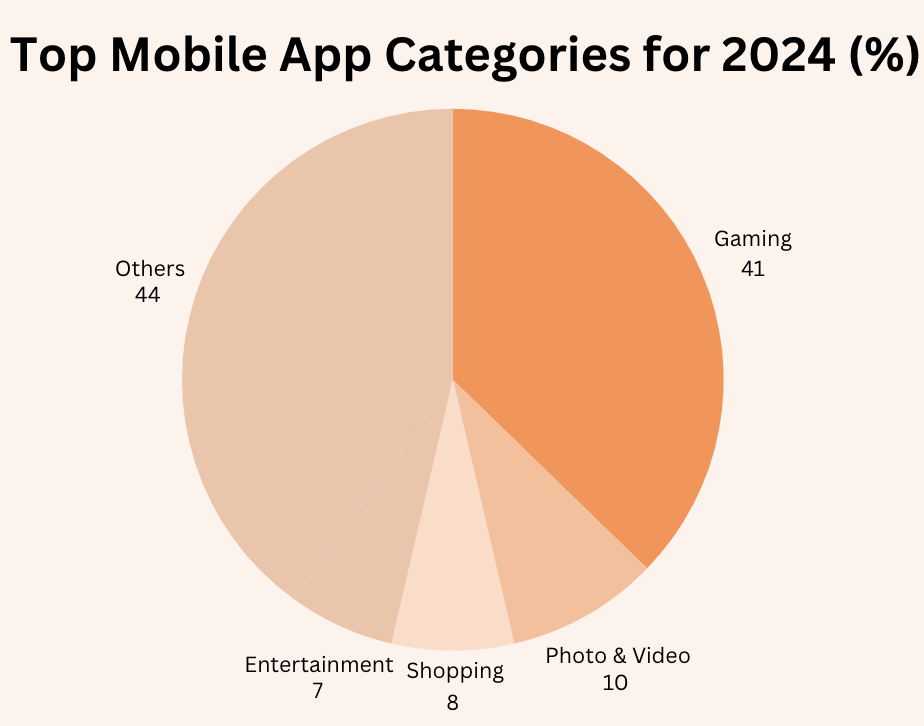
Top Mobile App Categories in 2025

Social Media Social media remains a dominant force in the app world. Apps like Instagram, TikTok, and emerging platforms have maintained their popularity, with millions of daily downloads and active users.
Key Insight: Short-form video content continues to drive engagement, with new features like AI-powered content recommendations keeping users hooked.

E-commerce Shopping apps have surged in downloads, driven by the growing trend of mobile commerce. Leading platforms like Amazon and Shopify’s Shop app are reshaping the e-commerce landscape.
Key Insight: Merchants offering seamless checkout experiences and personalized recommendations through mobile apps see higher conversion rates.

Gaming Mobile gaming apps remain a significant contributor to global app downloads, with games like Roblox and Genshin Impact consistently topping the charts.
Key Insight: Immersive graphics, social features, and regular updates keep users engaged and spending on in-app purchases.


Conclusion

The mobile app market in 2025 highlights the importance of innovation, user-centric design, and adaptability. By understanding what drives app downloads and engagement, businesses can tap into these trends and create apps that resonate with users.

As you plan your next steps, consider how your business can leverage these insights to stay ahead in the competitive app landscape.

For a detailed blog :https://meetanshi.com/blog/mobile-app-download-statistics/


Get more of our update !